


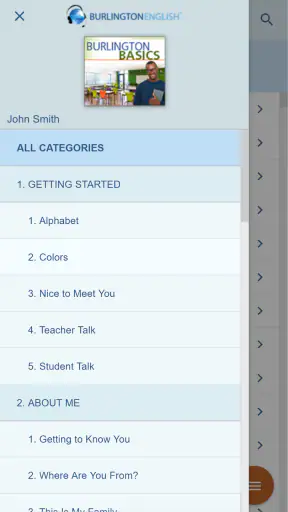
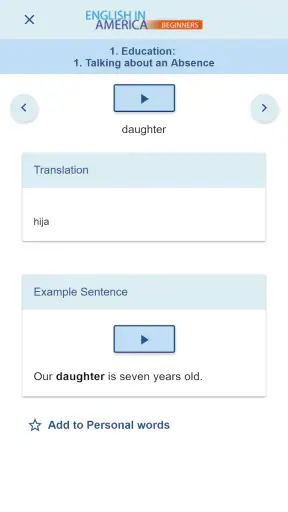
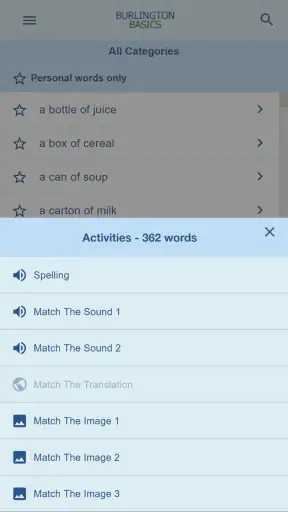
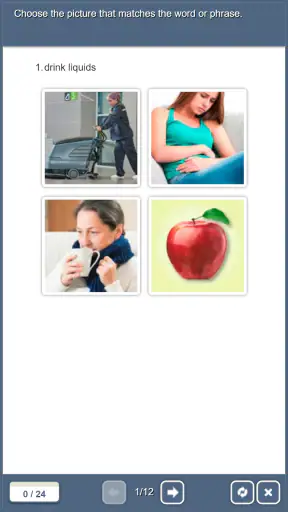
I approached BurlingtonEnglish as someone who wanted a practical route into structured English study rather than another collection of disconnected vocabulary cards. Developed by Burlington Education Ltd., this free education app is designed as an entry point to the wider BurlingtonEnglish language-learning program. That distinction matters: it feels less like a completely self-contained casual learning game and more like a mobile doorway into a planned learning experience.
My first impression was that its value depends heavily on what kind of learner you are and how you intend to use it. If you want a clear connection to an organized English course, it has a sensible purpose. If you expect an independent app that lets you freely jump between hundreds of unrelated mini-lessons, the experience may feel narrower. I would recommend it most readily to learners who are comfortable following a defined path and to people whose teacher, school, or training provider already uses BurlingtonEnglish.
From wanting to improve English to having a workable study routine
The starting condition for many learners is familiar: you know some English, but you are unsure what to study next. You may recognize words while reading and still hesitate when speaking, or understand a lesson but struggle to use the same language in an everyday situation. BurlingtonEnglish addresses that uncertainty by placing the phone at the entrance to a broader learning program instead of asking you to build a curriculum from scratch.
That is the first useful insight about the app. Its strongest feature is not necessarily the excitement of opening it for a quick distraction; it is the way it can give purpose to a study session. When I use an app in this category, I want to know whether I am reviewing, progressing, or simply tapping through activities. Here, the connection with Burlington Education Ltd.’s program gives the experience a more course-oriented identity.
The app is free to download, carries an Everyone content rating, and runs on devices using Android 6.0 or later. Those details make it approachable for learners who do not have a recent phone, although the quality of the experience will still depend on the screen, audio hardware, and general condition of the device. It is also worth separating “free” from “complete replacement for every form of study.” A free entrance to a program can be useful without being the same thing as a private tutor, a full classroom, or an unlimited conversation partner.
For a realistic example, imagine a learner preparing for a new job. They have a few minutes before a shift, want to revisit English connected to work, and do not want to waste that time deciding which random lesson to open. The sensible workflow is to enter through the BurlingtonEnglish app, follow the relevant course direction, complete the assigned activity, and then carry the language into a conversation, written task, or classroom discussion. The phone becomes one stage in a larger process rather than the entire process.
What I would prepare before the first session
I would begin by deciding what outcome I actually need. “Improve English” is too broad to guide good app use. A better target might be understanding instructions at work, becoming more confident in everyday conversations, or building a consistent study habit. That target helps me judge whether the program is helping, because I can compare each session with a real situation instead of counting taps or completed screens.
I would also make sure I know whether I am using the app independently or alongside an existing BurlingtonEnglish course. This is an important handoff. A learner working with a teacher may receive direction that makes the app much more useful, while an independent user may need to spend more time interpreting the available path. The application can open the door, but a door is not the same as a map for every possible learner.
Another practical step is to choose a repeatable time and place. Language learning benefits from returning to the same material, and a phone makes it easy to confuse convenience with consistency. I would rather use a short, focused session during a commute break or after dinner than open the app irregularly for long periods and forget what I studied. The best routine is one that leaves enough attention for listening, reading, and responding instead of treating the app as background noise.
How the study flow works in everyday use
Once I start, I treat the app as a guided learning checkpoint. I first identify the lesson or program direction in front of me, then work through it without switching to unrelated entertainment. That simple rule prevents one of the common weaknesses of mobile language learning: the learner spends more time choosing material than practicing it.
During a session, I pay attention to three separate jobs. The first is recognition: can I understand the word, phrase, or instruction when it appears? The second is production: can I say or write something similar without copying the example? The third is transfer: can I use that language outside the app? Many learners stop after recognition because it feels comfortable. My own recommendation is to pause after an activity and create one personal sentence, even if the app does not explicitly require it.
This is one of the more useful ways to turn a structured program into active practice. If the lesson concerns language needed in a workplace, I would connect it to a real request I might hear from a colleague. If the focus is everyday English, I would imagine using it in a shop, on public transport, or during a phone call. That extra step reveals whether I have actually learned something or merely recognized the answer on screen.
I would not use BurlingtonEnglish as my only speaking environment. A mobile course can organize practice, but confidence also comes from responding to unpredictable people. After completing a session, I would read key phrases aloud, record myself with the phone’s ordinary recording function if available, or practice with a classmate. This does not require inventing a feature inside the app; it is simply a sensible handoff from guided study to real communication.
The handoffs that determine whether the app helps
The first handoff is from the learner’s goal to the course path. If that connection is clear, the app feels purposeful. If it is unclear, the learner may complete activities without knowing why they matter. I would write down the specific situation I want to handle and keep it beside me during study. That small habit makes the program easier to evaluate and reduces passive clicking.
The second handoff is from the app to a teacher or training setting. BurlingtonEnglish makes particular sense when a learner is already connected to an organized language-learning program. In that situation, the mobile experience can support work done elsewhere: a student studies on the phone, then brings questions, difficult phrases, or pronunciation concerns to a teacher. The teacher, in turn, can help correct misunderstandings that an app alone may not notice.
The third handoff is from one session to the next. I would avoid assuming that finishing a lesson means the language is secure. Instead, I would keep a small list of phrases that caused hesitation and revisit them at the start of the next session. This creates a personal review loop around the app. It is especially useful for learners who understand lessons while looking at the screen but lose access to the language when speaking without visual support.
The fourth handoff is from study to evidence. A learner should be able to point to something they can now do more comfortably: follow an instruction, ask for clarification, introduce themselves, or understand a familiar exchange. I would test one such task each week in a natural setting. This is more meaningful than relying only on the satisfaction of completing a screen, because language ability is ultimately visible in communication.
Where it compares well with familiar alternatives
Compared with casual vocabulary apps, BurlingtonEnglish has a more program-led identity. A vocabulary app is often excellent for quick repetition and low-pressure practice, but it may leave the learner to decide how isolated words fit into a broader goal. BurlingtonEnglish is more attractive when you want your mobile study to belong to a defined language-learning framework.
Compared with video-only lessons, the app offers a more direct study routine. Videos can explain language clearly, but watching can become passive. A structured mobile activity encourages me to do something with the material rather than simply finish an episode. The trade-off is that video lessons may provide richer visual explanation or a stronger sense of a teacher’s personality, while a program entrance app may feel more functional.
Compared with a private tutor, BurlingtonEnglish is obviously more convenient for independent practice and less expensive at the point of download. It can help a learner arrive at a lesson better prepared and make use of small gaps in the day. A tutor remains better for immediate correction, personalized pacing, and spontaneous conversation. I would not choose the app instead of a tutor when my main problem is persistent pronunciation trouble or anxiety during live speaking; I would use it to make tutoring time more productive.
Compared with a general translation tool, the app is better suited to learning rather than merely solving a single language problem. Translation is useful when I need an answer immediately, but it does not automatically create memory or confidence. BurlingtonEnglish makes more sense when the goal is to build ability over repeated sessions. On the other hand, someone who only needs to translate an occasional message may find a full learning program unnecessary.
What the public response suggests, and how I interpret it
The app has an average rating of 4.4 from around 1.7 thousand ratings, with more than two hundred written reviews, and it has passed the one-million-install mark. I read those figures as evidence that BurlingtonEnglish has reached a substantial audience and that many users find the concept worthwhile. I would not treat the rating as a guarantee of a perfect experience, because language apps are unusually dependent on learner goals, course context, device habits, and expectations.
The version shown is 1.0, which is a detail I would keep in mind when deciding how much flexibility to expect from the mobile experience. A learner looking for a mature, endlessly customizable platform may prefer an app whose identity is built around a larger collection of independently adjustable tools. Someone who values a straightforward entrance into BurlingtonEnglish may see the focused approach as an advantage rather than a weakness.
There is also a difference between being widely installed and being right for a particular person. The app’s audience may include learners using it as part of formal study, people exploring the BurlingtonEnglish approach, and users who simply want guided practice. Before committing to a long routine, I would spend a few sessions checking whether the lesson direction matches my level and immediate needs. That is a better test than assuming popularity will solve a mismatch.
Where the workflow breaks down
The first point of friction is expectation. If I open the app hoping for a completely open-ended language playground, I may be disappointed by the course-oriented design. Its purpose is clearer when I accept that it is an entrance to a specific program. Learners who want to mix several languages, create highly personal study decks, or jump constantly between unrelated topics may be better served by a more flexible general-purpose platform.
The second weakness is the gap between guided practice and spontaneous communication. Even a well-organized lesson cannot reproduce every interruption, accent, speed, or misunderstanding found in real conversation. I would therefore avoid judging my speaking ability by how smoothly I move through an activity. The meaningful test comes later, when I have to respond without the same visual prompts.
The third issue is dependence on the surrounding workflow. A teacher, course, or clear personal plan can make the app feel purposeful. Without that support, an independent learner may need to create their own structure and decide how to review. That is manageable, but it requires more initiative than the store summary might suggest. I would skip this option if I strongly dislike following a defined program and want every part of my study plan to be self-designed.
Another possible break occurs when the learner uses the app only in tiny fragments. Short sessions are useful, but constant interruption can prevent deeper attention. I would rather complete one focused activity and then apply it than open the app repeatedly while distracted. The phone’s convenience is a strength only when it protects regular practice instead of encouraging shallow checking.
Device age can also affect comfort. The minimum operating-system requirement is Android 6.0, so compatibility is reasonably broad, but compatibility alone does not promise a pleasant experience on every older handset. Small screens, weak speakers, limited storage, or unreliable connectivity can make language work tiring. If listening clarity and quick response are central to my study, I would test the app on my actual phone before planning an ambitious routine.
Who should use it and who should choose something else
I would recommend BurlingtonEnglish to learners who want a structured route, appreciate a connection to a named language program, and are willing to continue practicing beyond the screen. It is particularly suitable for someone who benefits from a planned sequence rather than an endless menu of random exercises. It also suits learners who want to use short periods during the day to support a broader course.
I would be more cautious for complete beginners who need extensive personal explanation at every step, advanced learners seeking specialized professional debate, and users whose main priority is live conversation with immediate correction. Those people may need a teacher, conversation exchange, or a more specialized platform alongside—or instead of—the app.
The app is free and rated for Everyone, which lowers the barrier to trying it. Still, I would not install it merely because it costs nothing. I would install it when its program-based approach matches my goal. The most important question is not whether I can open it easily; it is whether I can connect each session to a real language outcome.
My final workflow and recommendation
My preferred routine is simple: define one real situation, enter the relevant BurlingtonEnglish study path, complete a focused activity, note the phrase or skill that caused difficulty, and use it later in speech or writing. If a teacher or course is involved, I would bring those difficulties to the next handoff instead of silently repeating the same mistake. At the end of the week, I would test whether the language helps me perform one concrete task more confidently.
That workflow captures both the app’s strength and its limitation. BurlingtonEnglish can give English study a clear starting point and a useful connection to a larger program. It is less convincing as a stand-alone solution for every learner, especially someone seeking unlimited customization or realistic conversation practice inside one application.
Overall, I see it as a practical education app for people who want direction rather than novelty. Its free access, broad device compatibility, Everyone rating, and established audience make it easy to consider, while its course-led identity tells me exactly how to approach it: not as a magic shortcut, but as a structured stage between intention and real-world use. The best results come when the app is treated as part of a complete learning workflow, not the final destination.


